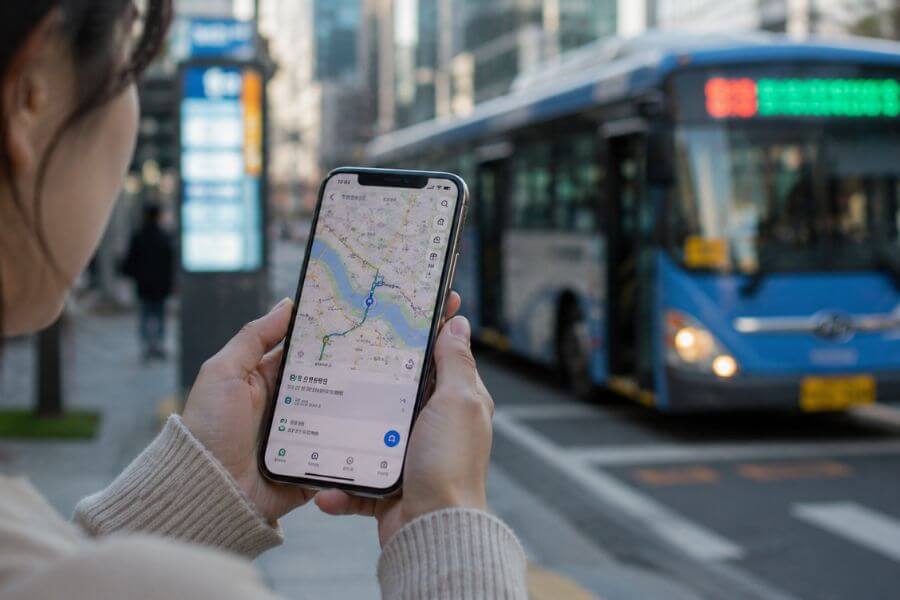
Key Takeaway for Your Journey
When you travel to South Korea, your usual navigation and translation tools will not work the way you expect. Because of local security laws, Google Maps does not offer accurate walking directions or real-time transit updates in the country. To explore like a local, you must download a specific set of local Korean applications before you arrive. By setting up Naver Map or KakaoMap for navigation, Kakao T for hailing rides, and Papago for translating text and speech, you will transform your smartphone into the ultimate travel companion. These specialized tools ensure you never get lost, help you order food with confidence, and allow you to navigate the flawless subway and bus systems without a single worry.
The Unique Digital Landscape of South Korea
For most places in the world, one single map application is all you need to travel from city to city. In South Korea, the digital rules are completely different. The government keeps a tight lock on geographic data for national security reasons. Because of this, global companies cannot host detailed map data on servers outside the country.
Local companies have built their own systems to serve the public. These domestic applications are deeply woven into the daily life of every Korean citizen. They do not just show you streets; they tell you exactly which subway car door to stand next to so you can transfer faster. They show you if a restaurant has seats available or if a local bus is delayed by three minutes due to traffic.
To enjoy your trip, you need to change your digital habits. Stepping into the Korean app ecosystem might feel unfamiliar at first, but it opens up a world of incredible convenience. You will discover that these local platforms are far more advanced, detailed, and accurate than the global tools you use at home. Let us look at the exact tools you need to download to make your adventure smooth and joyful.
Navigating the Streets: Your Primary Map Choices
You need a reliable map to walk through the historic alleys of Bukchon Hanok Village or find a hidden cafe in the trendy streets of Hongdae. Since global options are not reliable here, you have two main choices that every local uses. Both are excellent, but they have slightly different styles.
Naver Map: The All-In-One Explorer
Naver is often called the Google of South Korea. It is the largest search engine in the country, and its map application is incredibly powerful. For international travelers, Naver Map is usually the top choice because it has spent years perfecting its English user interface.
When you open Naver Map, you see a highly detailed view of your surroundings. The application excels at showing you what is inside buildings. If you are looking for a specific shop on the third floor of a massive mall, Naver Map will often show you the exact layout of that floor.
Its search function is smart. You can type in an English name, a phone number, or a Korean address, and it will usually find the exact spot. The walking directions are highly precise. It uses your phone compass to show you exactly which way you are facing, which prevents you from walking down the wrong street. It also features a magnificent street view option that lets you see actual photos of the roads, so you can recognize landmarks before you even get there.
KakaoMap: The Fast and Smooth Alternative
Kakao is another massive tech giant in South Korea. You will see their cute cartoon characters on everything from pillows to bank cards. Their map application, KakaoMap, is famous for being incredibly fast and visually clean.
KakaoMap is favored by people who love a smooth, interactive experience. The 3D map view allows you to rotate the buildings on your screen, making it much simpler to understand your physical surroundings. If you are standing surrounded by giant skyscrapers in Gangnam, turning on the 3D view helps you match the buildings on your screen to the real world instantly.
The application updates its transit data with lightning speed. It tells you exactly when a bus will arrive, down to the second. It even shows you the current speed of the approaching bus. While its English search is very good, it sometimes requires you to know the exact spelling of a place, or it works best if you paste the Korean name directly into the search bar.
A Direct Comparison of the Big Two Maps
To help you choose which one to use as your main guide, let us look at how they handle daily travel tasks.
- English Search Accuracy: Naver Map is highly flexible with English names. KakaoMap works best if you use precise names or Korean text.
- Walking Directions: Naver Map provides clear audio cues and great compass tracking. KakaoMap offers highly detailed path options but requires more manual panning.
- Visual Style: Naver Map uses a traditional, data-heavy layout. KakaoMap features a modern, clean design with 3D elements.
- Offline Capabilities: Naver Map allows you to download certain map areas to view without data. KakaoMap relies heavily on an active internet connection.
Most travelers find it helpful to download both. You can use Naver Map for your daily walking tours and switch to KakaoMap when you want to double-check bus times or look at a gorgeous 3D view of a neighborhood.
Master the Train and Bus Systems
South Korea has one of the finest public transportation networks on earth. The subways are spotless, quiet, and climate-controlled. The buses run frequently and reach every single corner of the country. To use this network efficiently, you need specialized transit applications.
Subway Navigation Apps
While your main map apps can calculate subway routes, dedicated subway apps make the process much simpler. The top app for this is Subway Korea.
When you open Subway Korea, you are greeted by a massive, color-coded map of the entire train network. You can tap your starting station and your destination station. The app instantly calculates the quickest route.
It tells you the exact time the train will arrive. It also tells you something critical: the best train car number for transferring. If the app says “Transfer at door 4-3,” you should walk to that exact spot on the platform. When you step off the train, the stairs or escalator to the next line will be right in front of you. This saves you from walking down long platforms and getting lost in massive stations like Seoul Station or Bupyeong Station.
Another great option is Kakao Subway. This app integrates beautifully with the Kakao ecosystem. It sends you live alerts on your phone screen, telling you when to get off the train. This is wonderful if you like to listen to music or read a book during a long commute. You do not have to constantly stare at the overhead signs to know if your stop is next.
Deciphering the City Buses
Buses in South Korea are wonderful, but they can feel intimidating because things move fast. The buses are color-coded by their route type. Blue buses connect different districts across the city, green buses run shorter routes within a single district, and red buses are express lines that connect the suburbs to the downtown core.
To ride these buses like a professional, you should use Kakao Bus or Naver Map. When you wait at a bus stop, the app shows you exactly how many minutes away your bus is. It also tells you how crowded the bus is. It will say “Empty,” “Normal,” or “Crowded.” If you see that an approaching bus is completely packed, you can use the app to see if another bus is coming right behind it, allowing you to wait for a more comfortable ride.
Taxis and Ride Hailing Without a Local Phone Number
There will be times when your feet are tired after walking ten miles through palaces, or you have heavy bags to carry to the train station. In these moments, you need a ride. Traditional ride-sharing apps that you use in Western countries do not operate legally in South Korea in the same way. Instead, the country relies on its own regulated taxi system, which you can access through your smartphone.
Kakao T: The King of Korean Rides
Kakao T is the absolute king of ride-hailing in South Korea. It connects you directly to thousands of licensed taxis across every city. The app is available in English, which makes it incredibly useful for foreigners.
In the past, you needed a Korean phone number and a domestic credit card to use this app. Thankfully, the developers updated the system. Now, you can sign up using an international phone number. You can also select “Pay to the driver” as your payment method. This means you do not have to link your foreign credit card to the app. You simply hail the ride on your phone, step into the cab, and pay the driver with your physical credit card or your T-money transit card when you arrive at your destination.
Using Kakao T eliminates the biggest barrier to taking a taxi in Korea: the language barrier. You type your destination into the app in English, select your ride, and the app sends the exact location to the driver’s dashboard navigation screen. When you get in the car, you do not need to say a word. The driver already knows exactly where you want to go, and the price is calculated by a standard taximeter.
Alternatives for Hailing a Car
If you want an alternative, you can look into UT, which is a joint venture between Uber and a local company. The amazing thing about UT is that if you already have the Uber app on your phone, it will automatically switch to the UT interface when you open it inside South Korea.
UT allows you to link your international credit cards directly to the app, so you can enjoy an automated payment experience. The car choices might be slightly more limited than Kakao T in smaller cities, but it works flawlessly in major metropolitan hubs like Seoul, Busan, and Daegu.
Overcoming the Language Barrier with Translation Tools
To navigate a country, you need to understand the words around you. Street signs, menus, bus stops, and train announcements are often written in Hangeul, the beautiful Korean alphabet. While learning to read Hangeul is fun and useful, you will still need a digital translator to understand deep meanings and communicate with locals.
Papago: The Intelligent Translator
Do not use your standard translation tool in South Korea. It often creates stiff, strange sentences that confuse native speakers. Instead, download Papago. Created by Naver, Papago is trained specifically on the nuances of the Korean language. It understands context, honorifics, and local slang far better than any other service.
Papago offers several ways to translate. The most useful tool for travelers is the camera function. If you are standing in front of a menu at a local restaurant that only features Korean text, you simply open Papago, point your camera at the page, and the app replaces the Korean words with English text right on your screen. It maintains the layout of the menu, so you can see exactly what you are ordering.
The voice translation feature is also stellar. If you need to ask a convenience store clerk a question, you can speak English into the app. It will instantly speak the Korean translation out loud. The clerk can then press the button, speak Korean back into your phone, and you will read the English translation immediately. It turns stressful interactions into pleasant, friendly conversations.
Secondary Translation Helpers
While Papago should be your primary tool, keeping a dictionary app like Naver Dictionary on your phone can be helpful for deep exploration. If you want to understand the history of a specific food or need to know the precise definition of a word you see at a museum, this tool provides rich cultural context that standard translators miss.
Financial Apps and Digital Money Management
South Korea is a nearly cashless society. Locals pay for everything from a tiny pack of gum to a luxury meal using credit cards or digital wallets. As a traveler, you need to know how to manage your funds using local tech tools.
NAMANE and WOWPASS: The Modern Traveler Cards
To bridge the gap between foreign credit cards and the local payment network, companies have created specialized prepaid cards for tourists. The two most famous are WOWPASS and NAMANE. Both cards come with dedicated phone applications.
You purchase a physical card at an airport kiosk or major subway station. Once you have the card, you download the app and link it to your phone. These cards serve a dual purpose. They act as a regular debit card that you can use at any store or restaurant in Korea, and they also function as a T-money card for subways and buses.
The linked mobile applications allow you to track your spending in real time. Every time you buy a street food snack or pay for a souvenir, the app sends a notification showing your remaining balance. You can also use the apps to check how much money is left on your transit balance. If your balance runs low, the apps show you a map of the nearest kiosks where you can insert cash or use a foreign credit card to top up your account.
Traditional Transit Management
If you prefer to use a standard T-money card purchased from a convenience store, you can still use your phone to manage it. There are several balance-check applications available on the market. These apps use your phone’s Near Field Communication chip. You simply place your physical T-money card against the back of your smartphone, and the app reads the chip instantly, showing you exactly how much money you have left for your next bus or train ride.
Food Delivery and Restaurant Discovery
One of the greatest joys of traveling to South Korea is experiencing the incredible culinary scene. From sizzling Korean barbecue to steaming bowls of street noodles, food is everywhere. Local apps help you discover hidden gems and even bring the food directly to your accommodation.
Catch Table: Securing Your Spot
Many of the top restaurants in Seoul and Busan require reservations, or they have incredibly long wait lines. To avoid standing on the sidewalk for two hours, you should download Catch Table.
Catch Table has an English version designed specifically for international visitors. It allows you to browse popular restaurants, view their menus, and book a table in advance. If a restaurant does not accept reservations but uses a remote waiting list, you can use Catch Table to join the queue digitally while you are still walking around a nearby park or museum. The app sends you regular notifications telling you how many groups are ahead of you, so you can walk up to the door right when your table is ready.
Yogiyo and Coupang Eats: Delivery to Your Door
South Korea has a legendary food delivery culture. Locals love to order fried chicken or black bean noodles to their homes, hotels, or even to public parks along the Han River.
For a long time, ordering food delivery was impossible for tourists because the apps required local identification numbers. Today, apps like Coupang Eats and Shuttle Delivery have made it much simpler for global guests. Shuttle Delivery is fully English-based and accepts international payment methods. If you want to experience a relaxing night in your hotel room while enjoying authentic local dishes, these delivery applications are a dream come true.
Practical Steps to Prepare Your Phone Before Your Trip
To make sure all these applications work perfectly when you land, you need to take a few preparation steps before you leave your home country. Doing this work in advance prevents technical headaches later.
App Store Settings and Region Verification
Some Korean applications are region-locked, meaning they might not appear in your phone’s standard app store. Before you depart, open your app store settings and verify that your device can download international tools. It is highly recommended to search for and download Naver Map, KakaoMap, Kakao T, and Papago while you are still at home.
Setting Up Accounts and Verifying Phone Numbers
Many local apps require user verification. It is much easier to complete this verification while your phone can still receive standard text messages on your domestic network. For example, when you set up your Kakao T account, do it at home. The app will send a verification code to your current phone number. Once your profile is created, it will remain fully active and ready to use when you switch to a Korean data plan later.
Choosing Your Data Connection Option
None of these navigation and translation tools will work without a strong, continuous internet connection. You have three main choices for staying connected in South Korea: a physical SIM card, an electronic SIM, or a pocket Wi-Fi router.
- Physical SIM Card: You can pick this up at the airport. It gives you a local Korean phone number, which is incredibly useful if you need to receive text alerts for restaurant wait times.
- Electronic SIM: You can purchase and install this on your phone before you even leave home. It activates the moment you land, giving you instant data access without swapping physical chips.
- Pocket Wi-Fi: This is a small, portable router that you rent at the airport. It allows you to connect multiple devices, like your phone, laptop, and tablet, to one shared internet source.
A Complete Guide to Navigating a Korean Station
To see how these apps work together in real life, let us walk through a typical travel scenario: navigating a massive, multi-level transit station in downtown Seoul.
You wake up and want to visit a beautiful temple. You open Naver Map and type in the name of the temple. The app tells you to walk to the nearest subway station, enter through Gate 4, take Line 4, and ride it for six stops.
As you walk into the station, the environment feels overwhelming. There are shops, restaurants, and thousands of people moving in every direction. You open Subway Korea to check the train schedule. The app tells you that the next train arrives in three minutes, and you should stand near door 2-2 for the fastest transfer later.
You follow the overhead signs, which match the color coding in your app. You tap your physical tourist card at the turnstile, and your phone app updates to show your new financial balance. You look at the platform floor, find the painted numbers for door 2-2, and wait for the train.
While riding the train, you want to check what food options are near the temple. You open Catch Table and look at a map of restaurants surrounding your final stop. You find a highly-rated dumpling shop and place a digital reservation for lunch.
When the train arrives at your destination, you step off and immediately find the exit stairs, just as the app promised. Before you exit into the sunlight, you notice a beautiful poster on the station wall with historical text. You pull out Papago, take a quick photo of the poster, and read the English translation of the temple’s ancient history. You step outside, confident, informed, and completely in control of your journey.
Frequently Asked Questions About Korean Travel Apps
Can I get by in South Korea using only Google Maps for my entire trip?
No, it is highly recommended that you do not rely on Google Maps during your visit. While it can display basic layouts of major roads and show some transit lines, it does not provide accurate walking directions, and its business data is often outdated. Local apps like Naver Map provide vastly superior data, live updates, and exact pedestrian paths.
Do I need a Korean phone number to use the local taxi apps?
You do not need a Korean phone number to use Kakao T or UT. You can register for these applications using your domestic phone number from home. Just make sure to choose the option to pay the driver directly with cash or a card at the end of your ride, since linking a foreign credit card to the digital wallet can sometimes fail due to international banking regulations.
Is Papago really better than other major translation apps?
Yes, Papago is far more accurate for translating Korean. It was built by a local technology firm that deeply understands the structure, polite speaking styles, and idiomatic expressions of the Korean language. It avoids the awkward, literal translations that often confuse people when using other global translation software.
How do I search for places in Naver Map if I do not know how to type in Korean characters?
Naver Map has an excellent English search engine. You can type in the names of major tourist spots, hotels, and popular restaurants using standard English. If an English search does not bring up the result you want, you can open Papago, type the name there to get the Korean translation, and then copy and paste those Korean characters directly into the map search bar.
Will these Korean travel applications drain my phone battery quickly?
Because navigation apps use continuous global positioning data and live cellular connections, they do consume significant battery power. When you are out exploring for a full day, running maps, translation cameras, and transit trackers simultaneously, your battery will empty faster than usual. It is smart to carry a portable external battery bank in your daypack so you can keep your device charged while you are on the move.