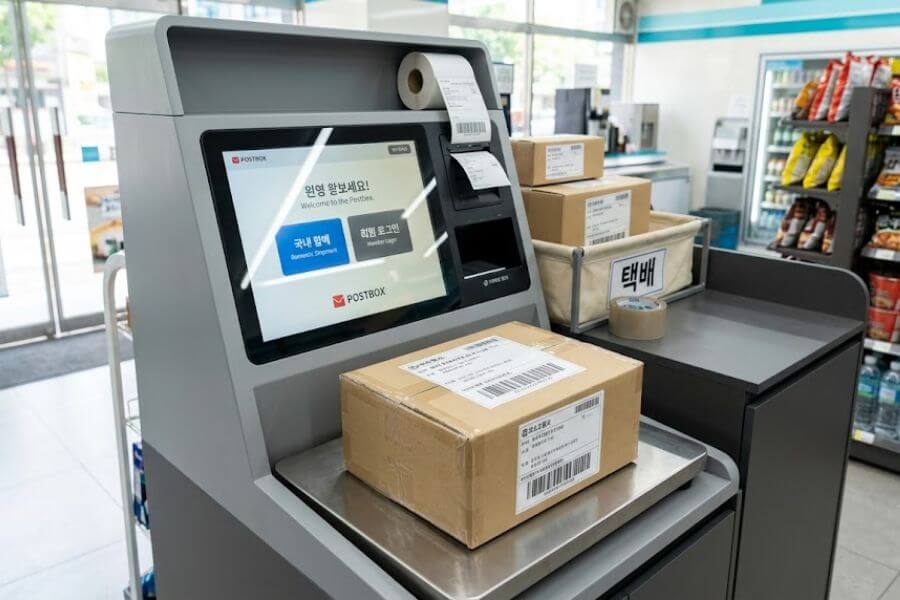
South Korea has a magnificent hidden champion for logistics, and it sits right on your neighborhood corner. Convenience stores like CU, GS25, and Seven-Eleven double as fully functional shipping hubs where you can drop off packages and even suitcases at any hour of the day or night. You do not need to rush to a traditional post office before it closes or speak fluent Korean to get your items safely across the country.
This ultimate guide will show you how to navigate the system like a local pro. You will discover how to turn an ordinary late-night snack run into a highly efficient shipping mission using automated kiosks and smart phone applications. From packing secrets to weight rules and pricing tiers, here is everything you need to know about South Korea’s neighborhood shipping network.
Understanding the South Korean Convenience Store Shipping Network
Before you carry your heavy boxes down the street, you need to understand how this massive infrastructure works. South Korea boasts tens of thousands of local shops, and almost all the major chains feature automated shipping terminals called Postbox systems. The stores themselves do not transport your boxes across the country. Instead, they act as secure, highly accessible drop-off stations for major national logistics companies such as CJ Logistics and Hanjin Shipping.
The biggest advantage of this system is the total freedom of time. Traditional post offices operate on strict daytime hours, but your neighborhood shop is open round-the-clock. If you want to process a package at three in the morning when the streets are empty, you can walk right in and use the terminal. This setup fits perfectly into a busy student routine, a hectic work schedule, or a fast-paced vacation itinerary.
You will encounter two main styles of shipping when you use these retail hubs. The first option is standard domestic delivery, which sends your package directly to any home or business address in the country. The second option is store-to-store shipping, known natively as Half-Price Delivery or CU-to-CU Delivery. This option sends your package from your local shop to another branch near your recipient, where they can pick it up at their own convenience. It reduces the cost significantly and protects the privacy of the receiver since they do not have to share their exact residential address.
Choosing Your Brand and Service Option
Not all convenience store chains use the exact same logistics network, though they operate in very similar ways. Knowing the minor differences between the top three brands will help you pick the best spot for your specific neighborhood.
CU Post Services
CU utilizes a dedicated subsidiary service known as CU Post. Their touch-screen kiosks are incredibly modern and frequently feature digital scale platforms built right into the base of the machine. CU has an excellent smartphone application that lets you register your shipping details before you leave your house, which saves you from typing out lengthy addresses on a public screen. They offer classic domestic shipping, international options through partnership networks, and their famous store-to-store delivery system.
GS25 Postbox
GS25 operates its shipping service under the brand name GS Postbox. Their machines are highly recognizable and function almost identically to the ones found in CU. GS25 is highly praised for its deeply integrated store-to-store delivery network, which they call Half-Price Delivery. Because GS25 has its own internal supply trucks driving to every store daily to restock food items, they use those same trucks to carry consumer packages. This smart reuse of transport keeps your prices incredibly low.
Seven-Eleven and E-Mart 24 Options
While CU and GS25 dominate the digital kiosk market, Seven-Eleven and E-Mart 24 also provide excellent options. Some of these locations feature the same automated touch-screen terminals, while smaller branches use a traditional paper waybill system. In a paper-based shop, you simply request a shipping form from the cashier, write down your details with a pen, stick the sticker onto your box, and pay directly at the front counter. It is a reliable fallback option if you happen to live right next to one of these brands.
| Feature Category | Standard Domestic Shipping | Store-to-Store Half-Price Delivery |
| Final Destination | Any residential or business address | A specific partner store branch |
| Average Delivery Time | One to two business days | Two to four business days |
| Starting Price Range | 3,200 to 4,000 Korean Won | 1,800 to 2,200 Korean Won |
| Maximum Weight Limit | 20 to 25 kilograms | 5 kilograms |
| Best Used For | Large parcels, gifts, and moving boxes | Small items, clothing, and second-hand sales |
Master the Rules of Professional Packing
The local cashier will gladly process your payment, but they will not pack your items for you. If your box is structurally weak, leaks, or contains prohibited goods, the logistics driver will reject it during the daily pickup round. Preparing your items correctly at home guarantees a smooth journey.
Sourcing Your Box and Packing Supplies
You must use a proper cardboard box for your items. Traditional paper shopping bags, thin plastic bags, and loose fabric wraps are strictly forbidden by the courier drivers. If you do not have a spare box lying around from an online shopping order, you can purchase brand-new shipping boxes directly at local post offices or large discount marts. Many neighborhood convenience stores sell small packing rolls, packing tape, and sheets of bubble wrap near their office supply shelves.
Weight and Measurement Restrictions
Your packages must fit within clear physical boundaries to be accepted by the digital kiosks. For standard domestic shipping, the total weight of your box must stay below 20 to 25 kilograms, depending on the specific chain. Additionally, the maximum length of any single side of the box cannot exceed 100 centimeters. The total combined sum of the width, length, and height of your box must be under 160 centimeters. If you are using the budget-friendly store-to-store delivery option, the rules are much tighter. Your box must weigh less than 5 kilograms, and the combined dimensions must stay under 80 centimeters.
Prohibited Items You Must Leave Out
The Postbox screen will ask you to confirm that your parcel does not contain any banned materials before it allows you to print a label. You must never attempt to ship loose cash, gold, legal documents, or identification cards. Fragile items made of glass or delicate porcelain are highly discouraged unless they are heavily wrapped in professional defensive materials, and even then, you must sign a digital waiver releasing the company from liability if things break. Furthermore, you cannot ship fresh food items that spoil fast, volatile chemicals, pressurized aerosol cans, or loose lithium-ion batteries.
Navigating the Digital Postbox Kiosk
Walking up to a large touch-screen machine in a foreign language can feel slightly intimidating, but the interface follows a very logical structural flow. Most modern kiosks feature a basic English language button on the main welcome screen, usually located in one of the top corners. Even if the English option is down for maintenance, you can navigate the Korean screens easily by following these steps.
Logging In as a Member versus a Non-Member
When you tap the screen to begin, the machine will ask if you want to use a member account or proceed as a non-member. For short-term tourists or one-time shippers, selecting the non-member button is the most efficient choice. If you plan to stay in South Korea for several months or years, downloading the CU Post or GS Postbox application on your smartphone and creating a member account is highly recommended. Members receive permanent daily discount coupons, and they can type out complex addresses on their phones beforehand. At the store kiosk, members simply scan a personalized quick-response code on the screen to log in instantly.
Entering the Address Correctly
South Korea utilizes a highly specific five-digit postal code system alongside a road-name address format. When typing the address into the kiosk, you will first enter the five-digit zip code or the primary road name. The machine will then show you a list of matching neighborhoods. Once you select the correct primary street name, a second box will appear where you must type the specific details, including the building number, apartment floor, and individual room number. You will need to input this information for both the receiver and yourself as the sender. The system requires a valid South Korean cell phone number for both parties so that automated text alerts can be sent throughout the delivery process.
Utilizing the Integrated Scale
Once all the text information is correctly saved in the system, the kiosk will instruct you to place your box onto the weighing platform. This platform is typically the metal plate built directly into the base of the machine, right in front of the screen. Ensure that the box is centered on the plate and that no part of the package is leaning against the surrounding counter or the screen casing, as this will distort the weight calculation. Keep your hands off the box while the digital scale calculates the weight. The screen will display the weight in grams and automatically calculate your final shipping fee based on your destination province.
Step-by-Step Guide to the In-Store Shipping Process
To make your first shipping trip completely seamless, let us walk through the exact physical routine from the moment you step through the automatic glass doors of the convenience store.
Step 1: Locate the Shipping Station
Walk into the store and scan the room for the automated kiosk. It is usually placed on a dedicated side counter near the back wall, often positioned right next to the store automated teller machine, public printer, or instant ramen hot-water station. If you do not see it immediately, look up at the ceiling signs for the word “Postbox” or politely ask the worker by saying the word for shipping, which is “Taek-bae.”
Step 2: Input Your Details and Confirm
Follow the on-screen prompts to input your recipient address, sender address, item category, and estimated monetary value of the contents. If you made a pre-booking on your smartphone application, log in using your account details or scan the quick-response login code, select your active reservation from the history list, and verify that the populated data matches your physical package.
Step 3: Weigh the Package
When the screen prompts you, place your cardboard box firmly onto the scale platform. Wait three to five seconds for the machine to lock in the weight measurement. Review the final summary screen, which displays the total weight, the destination address, and the exact monetary charge. Tap the final confirmation button to initiate the printer.
Step 4: Collect and Separate Your Labels
The machine will activate a small industrial label printer located directly above or below the screen. It will slide out a long, sticky, dual-section paper strip. The larger section of the sticker contains the primary shipping barcode and the full delivery address. The smaller secondary section is your personal customer receipt, which features the tracking number. Gently peel the large adhesive sticker away from the backing paper.
Step 5: Affix the Shipping Label and Inform the Cashier
Press the large sticky label firmly onto the clean top surface of your cardboard box. Avoid placing the barcode over the seams of the box flaps or across packing tape, as wrinkles can prevent the delivery driver’s handheld scanner from reading the code. Hold your box and the smaller paper receipt chunk in your hands, then walk over to the main front checkout counter where the cashier stands.
Step 6: Complete Your Payment
Hand your smaller receipt slip to the cashier. They will scan the barcode on your receipt using their standard retail register scanner. You can pay the shipping fee using local cash, Korean debit cards, major international credit cards, or mobile payment systems like Samsung Pay and T-Money cards. The cashier will provide you with a final stamped retail receipt.
Step 7: Deposit the Package in the Secure Storage Area
Once payment is complete, you must place your box in the designated package drop-off zone inside the store. This area is typically a large green plastic storage bin, a fabric hamper, or a neat stack on the floor located right next to the shipping kiosk. If you cannot find the designated pile, look to where the cashier points or place it inside the large collection box labeled for outgoing shipments. Your job is now officially complete.
How to Ship Heavy Luggage and Suitcases
One of the most valuable secrets of South Korean logistics is that you can ship entire pieces of rolling travel luggage through local convenience stores. This is a massive relief for travelers who want to explore a new city without dragging a massive suitcase through crowded subway stairs and cobblestone streets.
Preparing a Suitcase for Transit
Because a suitcase does not have a flat, uniform cardboard surface, you must take extra steps to protect it and ensure the shipping label stays attached. You should lock all the zippers securely using travel locks. Take a roll of transparent plastic stretch wrap or heavy packing tape and wrap it around the center body of the suitcase several times. This creates a smooth, flat surface where you can stick the sticky shipping barcode label. Alternatively, you can buy a dedicated plastic luggage tag holder, slide the printed paper label inside, and zip-tie it securely to the top heavy-duty handle of your bag.
Luggage Weight Limits and Pricing Realities
Suitcases are naturally heavier than standard cardboard boxes, meaning they will always fall into the upper pricing tiers of the convenience store shipping system. You must ensure your packed suitcase does not exceed the maximum weight cap of 20 to 25 kilograms. If your bag is filled with heavy books or thick winter gear and exceeds this limit, the digital scale will reject it, and you will have to split your belongings into smaller separate parcels. Expect to pay between 6,000 and 9,000 Korean Won for a large, heavy suitcase moving across provinces.
Tracking and Managing Your Shipments
South Korea possesses one of the fastest and most transparent tracking networks in the global logistics industry. The moment your package is scanned by the store employee or the daily collection driver, a real-time digital paper trail begins.
Reading Your Tracking Number
Your customer receipt contains a specific sequence of numbers called a “Song-jang-beon-ho.” This is your master tracking number. It is usually an eleven-digit or twelve-digit number printed clearly under the main customer barcode on your small receipt slice. Keep this piece of paper safe until you receive confirmation that your box has arrived safely at its final destination.
Using Delivery Tracking Applications
You do not need to speak Korean to monitor your package journey. You can copy your tracking number and paste it into the search bar of universal delivery tracking applications or global tracking websites. Alternatively, you can open any major Korean search engine, type the word for tracking tracking alongside your number, and click search to view a neat visual timeline of your parcel location. The system will show you exactly when the driver picked up the box from the store, which regional sorting facility it is currently passing through, and the precise name and phone number of the local delivery driver assigned to the final neighborhood drop-off.
Frequently Asked Questions
Can I ship a package internationally using a convenience store kiosk?
Yes, you can send international shipments from selected CU and GS25 locations that feature advanced Postbox terminals. These international services are managed through partnerships with major global couriers like DHL or the national postal system EMS network. However, you must ensure that your specific local branch supports international shipping, as some smaller neighborhood kiosks only have domestic software enabled. You will also need to type out the recipient country, full international address, and a detailed customs declaration list including the exact value and weight of every individual item inside the box.
What should I do if the digital kiosk does not have an English option?
If your local kiosk is running an older software version or the English language module is down, you can navigate the Korean screen easily using a live translation application on your mobile phone. Simply open an app that features a live camera translation mode, hover your phone screen over the kiosk display, and read the text in your native language. The button locations remain identical regardless of language. The top options are always for domestic shipping, the center buttons handle weight confirmation, and the final blue buttons at the bottom initiate the label printing process.
How long does it take for a convenience store package to arrive at its destination?
Standard domestic shipping within South Korea is incredibly fast. If you drop off your package before the daily collection cutoff time, which is usually 5:00 PM in major metropolitan areas like Seoul and 3:00 PM in rural provinces, your package will almost always arrive at its destination on the very next business day. If you drop off your package late at night or over the weekend, it will be collected during the next available weekday driver route, resulting in a total transit time of two to three business days. Store-to-store shipping takes slightly longer, usually requiring two to four business days.
Can I use convenience store shipping if I do not have a South Korean phone number?
The automated Postbox system requires a valid ten-digit or eleven-digit South Korean mobile phone number to complete a non-member booking because the system automatically sends automated text message receipts and real-time tracking updates. If you are a short-term tourist without a local subscriber identity module card, you cannot complete the digital forms with an international phone number. To get around this roadblock, you can ask a trusted local friend, your school administrator, or your hostel host if you can input their local phone number into the sender field so the transaction can proceed.
What happens if my recipient is not home when the delivery driver arrives?
In South Korea, delivery drivers rarely require a physical signature for everyday domestic parcels. If your recipient is not at home when the driver reaches the address, the driver will safely place the box in front of their apartment door, drop it off inside the building secure lobby locker system, or leave it with the community security office. The driver will then snap a digital photograph of the package in its secure location and send it via text message to the recipient’s phone number, ensuring they know exactly where to find it.
How do I use the store-to-store delivery option if I want to save money?
To utilize the store-to-store budget option, you must choose the specific button labeled as Half-Price Delivery on a GS25 kiosk or CU-to-CU Delivery on a CU machine. During the address entry phase, you will not type in a residential home street name. Instead, you will search for the specific name or neighborhood branch of the convenience store where your recipient wants to collect the package. Once the package arrives at that destination branch, your recipient will receive an automated text message containing a secure pickup barcode. They simply show that barcode to the shop clerk to claim their box.
Is there a specific pickup schedule for the shipping boxes at the store?
Yes, the professional logistics drivers follow a strict daily routine. In major cities, the collection truck arrives at each convenience store once per day, Monday through Friday, usually between 3:00 PM and 5:00 PM. On Saturdays, the pickup occurs much earlier, typically around noon. There are no driver collection routes on Sundays or national holidays, though you can still walk into the store and process your package at the kiosk on those days to ensure it is the very first box collected on Monday morning.
What are the precise maximum limits for store-to-store shipping?
The store-to-store delivery system uses the company internal grocery supply trucks, which means space is limited and rules are enforced tightly. Your parcel must weigh less than 5 kilograms. The absolute maximum dimensions state that the sum of the box width, length, and height cannot exceed 80 centimeters. Furthermore, the contents must consist of durable goods like books, clothing, or sealed non-perishable cosmetics. You are strictly banned from sending electronics, liquids, shoes, or fragile items through the store-to-store network.