Have you ever stayed up until 2:00 AM, staring at a spinning loading wheel, praying to the internet gods that you will get to see your ultimate bias group live? If you are a global K-pop fan, you know exactly how painful that waiting game can be. Landing a seat at a major concert in Seoul often feels harder than winning the lottery.
The good news is that Korean entertainment agencies are making it easier for international fans to join the crowd. Major ticketing platforms now have global pages built specifically for fans living outside South Korea. In this comprehensive blueprint, you will learn exactly how to navigate these foreign-friendly sites, set up your accounts, beat the ticketing clock, and secure your spot in the stadium.
Understanding the Korean Ticketing Ecosystem
The first thing you need to know is that buying concert tickets in South Korea works differently than in many Western countries. You will not find most major K-pop tours on platforms like Ticketmaster or StubHub. Instead, South Korea relies on a few local tech giants that control the live entertainment market.
These platforms operate under a strict exclusive partnership system. If an entertainment agency decides to sell tickets for a group through one specific platform, you cannot buy them anywhere else. This means you must adapt to whichever platform your favorite group chooses for their tour.
The Role of Global Sites
Because local Korean websites require a Korean phone number, a domestic credit card, and a resident registration number, they are completely locked to foreigners living abroad. To fix this issue, ticketing companies created global versions of their websites.
These global sites are stripped-down versions of the domestic platforms. They are written in English, Chinese, and Japanese. They allow you to log in without a local identity verification step, and they accept foreign credit cards. Your main goal as an international fan is to master these global portals.
The Realities of Ticket Scarcity
You are competing against a massive fanbase. K-pop is a global phenomenon, and thousands of fans travel to Seoul for every major concert. High-demand shows can sell out in less than sixty seconds.
Understanding the ecosystem means accepting that speed, preparation, and timing are everything. If you skip a single step in your preparation, you might find yourself looking at a sold-out screen before you even select your zone.
The Big Three Global Platforms
While there are smaller ticket sellers, three major platforms handle nearly all K-pop concert sales in South Korea. You need to create an account on all three well before any concert announcement drops.
Interpark Ticket Global
Interpark is the historic giant of K-pop ticketing. It handles massive stadium shows, including concerts for artists under SM Entertainment, JYP Entertainment, and various independent labels.
The global version of Interpark is highly functional but can feel a bit old-fashioned. It uses a pop-up window system for the actual seat selection process. This means your browser settings must be perfectly configured, or the buying screen will not even load.
Yes24 Ticket Global
Yes24 is another massive platform that frequently hosts ticketing for SM Entertainment artists, specialized music festivals, and mid-sized arena shows.
The Yes24 global interface is relatively clean, but it is known for having heavy server lag during the first five minutes of a major sale. It utilizes an automatic queue system that assigns you a number based on the exact millisecond you clicked the button.
Melon Ticket Global
Melon Ticket is owned by Kakao and is heavily linked to the domestic music streaming chart. This platform is frequently chosen by IU, various HYBE labels, and popular indie artists.
Many fans consider Melon Ticket to have the smoothest global interface. It handles heavy traffic well and provides clear error messages if something goes wrong. However, it is also incredibly strict about account verification and timing.
Platform Comparison Overview
| Platform Name | Common Artists | Major Payment Methods | System Style | Key Weakness |
| Interpark Global | SM, JYP, Infinite | Visa, Mastercard, JCB | Pop-up Window | Pop-up blockers kill your attempt |
| Yes24 Global | SM, Ateez, Shinee | Visa, Mastercard, UnionPay | Queue Number | Severe server lag during peak times |
| Melon Global | IU, HYBE, Seventeen | Visa, Mastercard, Amex | Queue & Refresh | Strict verification locks |
Pre Ticket Sale Preparation
You cannot expect to log in five minutes before a sale and successfully buy a ticket. The preparation stage happens days, or even weeks, before the clock strikes the designated hour.
Account Creation and Matching Names
Your first step is to create accounts on Interpark, Yes24, and Melon. When you fill out your profile information, your legal name must match your passport exactly.
If your passport reads “Smith Jane Emily,” do not type “Jane Smith” on your account profile. If the name on your ticket confirmation does not match your physical passport when you arrive at the venue in Seoul, staff will deny you entry. There are no exceptions to this rule, and they will not issue a refund.
Browser Configuration and Pop Up Fixes
Most Korean ticketing systems rely on a pop-up window to load the seat map. If your browser blocks pop-ups, you will click the booking button, nothing will happen, and you will lose your spot in line.
Go into your browser settings right now and add the global URLs of Interpark, Yes24, and Melon to your exception list. Enable pop-ups and redirects for these sites. It is best to use Google Chrome, as most global platforms optimize their code for Chrome users.
Internet Connection and Hardware Choice
A stable, fast internet connection is mandatory. If possible, plug your computer directly into your router using an ethernet cable instead of relying on Wi-Fi.
While you can use mobile devices, desktop computers or laptops are far superior for global ticketing. The mobile browser versions of these global sites can be unstable, and selecting tiny seat boxes on a small touchscreen is incredibly difficult when you are rushing.
The Power of Official Fanclub Presales
For almost every major K-pop group, buying a ticket during the general public sale is nearly impossible. This is because entertainment companies hold an official fanclub presale first.
During a presale, verified fanclub members get access to the ticket pool one or two days before everyone else. By the time the general sale opens, only the least desirable seats or random single spots remain. If you want a good seat, joining the fanclub is a necessary investment.
Buying the Membership on Weverse or Plus Chat
Most fanclub memberships are sold through platforms like Weverse Shop or Plus Chat. Look for the global membership option for your specific group.
You can purchase these memberships at almost any time of the year, though some groups still use limited registration windows. Once you buy the membership, you will receive a unique membership number. Keep this number safe.
The Crucial Pre Verification Step
Simply buying a fanclub membership does not mean you can automatically buy a concert ticket. You must complete a step called fanclub presale verification on the actual ticketing site.
A few days before the ticket sale begins, a dedicated verification button will appear on the concert page of Interpark, Yes24, or Melon. You must click this button, enter your Weverse or Plus Chat membership details, and link your accounts. If you miss the deadline for this verification step, which usually ends a day before the sale, your fanclub membership will be useless for the presale.
Step by Step Presale Alignment
- Purchase the official global fanclub membership on Weverse or the artist platform.
- Wait for the official concert announcement and find which ticketing site is hosting the sale.
- Log into that specific ticketing site and find the concert listing page.
- Click the “Fanclub Verification” button during the designated window.
- Enter your exact membership number and the email address linked to your fanclub account.
- Check for the confirmation pop-up stating that your verification was successful.
- Return to the page on the day of the presale to access the buying portal.
Mastering the Ticketing Timeline
Timing in South Korea is precise down to the millisecond. If a sale opens at 8:00 PM Korean Standard Time, it means exactly 8:00:00, not 8:00:01. You need to align your mindset with this level of accuracy.
Dealing with Time Zones
All K-pop ticket sales are announced in Korean Standard Time. You must convert this to your local time zone carefully.
Use reliable online world clocks to double-check your calculations. Remember to account for daylight saving time shifts in your own country, as South Korea does not observe daylight saving time. If you miscalculate by even one hour, you will completely miss the event.
Using an Atomic Clock Website
Do not rely on the clock displayed in the corner of your computer screen or your smartphone. These clocks can be synchronized poorly and might be off by two or three seconds.
Open a separate browser tab with an atomic clock website that shows the exact time in South Korea down to the second. Navyism is a popular clock tool used by Korean fans because it tracks the specific server time of individual websites. Watch this clock intently as the countdown approaches.
The Golden Five Minutes
The five minutes leading up to the sale require absolute focus. Log into your account fifteen minutes early. Navigate to the concert page. Ensure your credit card is sitting next to your keyboard.
When the atomic clock hits 7:59:55 PM, prepare your finger. The exact moment the clock strikes 8:00:00 PM, you must take action.
Navigating the Queue and Seat Selection
What happens after you click that booking button determines your success. This is where many fans panic, make mistakes, and lose their chance.
The Queue Screen Protocol
When you click the reservation button at exactly 8:00:00 PM, you will likely be greeted by a white screen with a loading bar and a number. This is the automated queue system. The number indicates how many people clicked the button before you.
The most important rule here is: do not refresh the page. If you panic and click the refresh button, you will lose your spot in line and go straight to the back of the queue. The number might look huge, sometimes exceeding fifty thousand, but the line moves fast. Let the system do its work.
Deciphering the Seat Map
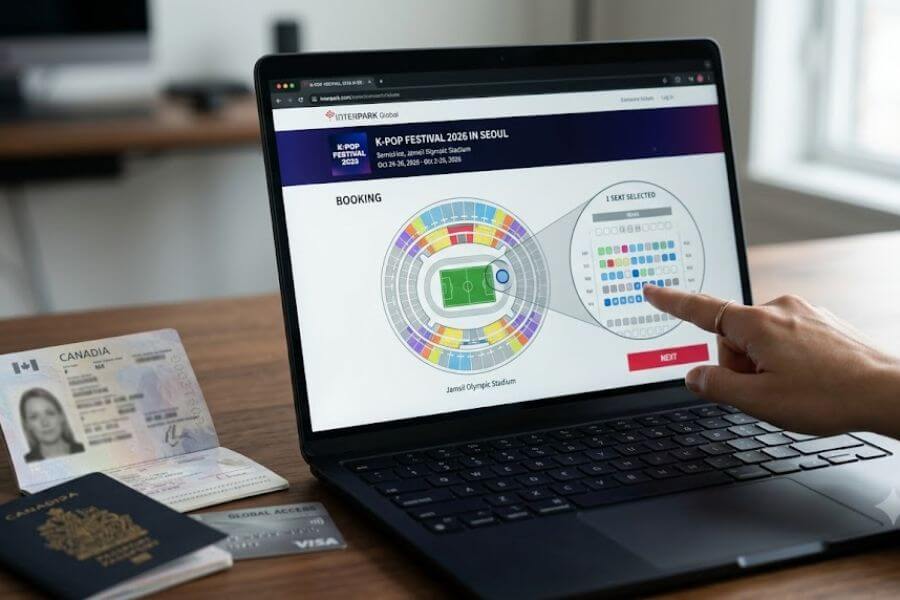
Once you clear the queue, the ticketing pop-up window will open. You will see a color-coded map of the venue. Each color represents a different price tier or zone, such as Standing VIP, Floor Seating, or Upper Level Tiers.
Click on a zone that still shows available seats. The system will then zoom into that specific section, showing individual small squares that represent seats. Purple or colored squares are available; grey squares are already taken.
The Purple Square Sprint
When you see a colored square, click it instantly and hit the “Seat Selection Completed” or “Next” button. Do not spend ten seconds thinking about whether Row 5 is better than Row 6.
While you are looking at a seat, hundreds of other fans are looking at it too. The seat is not reserved for you just because you clicked it. It only belongs to you temporarily once you successfully clear that page and move to the payment screen. If you get a pop-up saying the seat is already selected by another user, click okay and immediately look for another colored square.
Conquering Payment Processing Barriers
The payment step is where many international fans experience heartbreak. You select a great seat, move to the final screen, and then your transaction fails due to banking security blocks.
The Limitations of Global Cards
Korean global ticketing sites accept major international credit cards like Visa, Mastercard, and sometimes JCB or American Express. However, local payment systems are incredibly sensitive to security protocols.
Before the ticket sale begins, you must contact your bank or credit card company. Tell them that you will be making a purchase on a South Korean website. Request that they lift all international purchase blocks and fraud filters for that specific day. If your bank flags the transaction as suspicious, the ticketing system will cancel your seat hold within minutes.
The Step by Step Checkout Process
- Select your seat and click the next step button to lock it temporarily.
- Choose your ticket delivery method, which is almost always “Global Site Ticket Pick Up” or “Will Call.”
- Select “Foreign Credit Card” as your payment type. Do not try to select local Korean payment apps.
- Choose your card brand from the dropdown menu, such as Visa or Mastercard.
- Enter your sixteen-digit card number, expiration date, and security code.
- Complete any 3D Secure or Verified by Visa multi-factor authentication steps that pop up.
- Wait for the final confirmation page showing your reservation number.
Handling Failed Transactions
If your payment fails, look at the error code. If it says “Card Authorization Failure,” your bank blocked it. Quickly swap to a backup credit card if you have one ready.
Do not close the window if you can avoid it. Some systems allow you to try a different card within a short time limit. This is why having two different credit cards from different banking networks sitting on your desk is a smart strategy.
Ticket Collection and On Site Verification
Congratulations, you bought a ticket. Now you have to actually collect it when you arrive in South Korea. Global ticket sales do not send physical tickets to international addresses, nor do they usually provide printable digital barcodes.
The Concept of Will Call
You will collect your physical ticket at the concert venue on the day of the show. This system is called “Will Call” or “On Site Ticket Pick Up.”
The ticketing company sets up large booths outside the stadium, usually divided alphabetically by last name or by reservation number. These booths open several hours before the concert starts. Arrive early to avoid massive lines under the sun or in the cold.
Mandatory Documents to Bring
When you walk up to the ticket booth, you must present three specific items to the staff. If you are missing any of these, they will refuse to hand over your ticket.
- Your Physical Passport: Photocopies or digital images on your smartphone are not accepted. It must be the original document.
- The Ticket Reservation Confirmation: Print this out from the global website ahead of time. It must show your name and reservation number clearly.
- The Credit Card Used for Purchase: Bring the actual physical card you used to buy the ticket. Staff will sometimes check the numbers to verify identity.
Identity Matching Rigor
Korean event staff take ticket scalping and illegal reselling very seriously. They will look closely at your passport photo, your passport name, and the name printed on the reservation sheet.
If there is a typo or a mismatch because you used a nickname online, you will face intense questioning. If the staff determines that the account owner is not the person standing in front of them, the ticket will be canceled on the spot.
Navigating the Dynamic Identity Verification Systems
In recent years, entertainment companies have stepped up their security measures to combat automated ticket bots and illegal scalpers. You must be prepared for these advanced verification steps.
Explaining the Identity Bracelet System
For high-profile shows or floor sections where fans stand close to the stage, a confirmation paper is not enough to get you past the doors. You will be required to go through a dual-verification process outside the venue.
First, you line up at the ticket box to get your physical paper ticket. Next, you must walk to a separate “Identity Verification Booth.” Here, staff will check your passport again, verify your ticket, and fasten a tamper-proof plastic or fabric wristband onto your arm. You cannot enter the stadium doors without both your physical ticket and this wristband intact.
Handling the CAPTCHA Hurdles
When you first clear the online queue and enter the seat map page, a security screen will pop up requiring you to type a string of letters or numbers. This is a CAPTCHA code designed to stop automated computer programs.
On Korean global sites, these codes are usually composed of capital English letters. They are highly distorted to confuse bots. Do not rush blindly. Take a breath, type the letters carefully, and ensure your keyboard caps lock function is set correctly. If you mess up three times, you might get locked out of the selection screen for several minutes.
Anti Scalping Regulations
South Korea has strict legal frameworks regarding ticket reselling. Selling tickets for a profit is illegal.
If you are caught buying a ticket from an unauthorized source, or if you try to sell yours online, your ticket will be blacklisted. The ticketing companies run active tracking programs on social media. If they see a post showing a specific seat number for sale, they will cancel that seat instantly without warning.
Finding Leftover Tickets via Cancelation Rounds
If you fail to get a ticket on the initial launch night, do not lose hope. Thousands of tickets return to the system over the following days due to failed payments, accidental duplicates, or fans changing their minds.
The Nightly Cancellation Clock
Korean domestic buyers often use a payment method called “Virtual Bank Account Transfer,” which gives them twenty-four hours to deposit money. If they fail to pay by midnight the next day, their tickets are automatically canceled and thrown back into the system.
For global users, these canceled seats drop back onto the website at specific times. While the exact time varies by platform, a massive wave of returned tickets usually appears between 12:00 AM and 2:15 AM Korean Standard Time, two days after the initial sale. Logging in during these late-night windows can land you excellent seats with zero queue lines.
Global Return Monitoring Strategies
Check the global ticket page daily during your morning and evening routines. As the concert date approaches, fans realize they cannot book flights or hotel rooms, leading to a steady stream of individual ticket returns.
Platforms like Interpark sometimes feature a system where you can pay a tiny fee to register for an “Auto Re-booking” option or view real-time inventory updates. Keep refreshing the specific concert page whenever you have spare time. Persistence pays off.
Last Minute Ticket Drops
Entertainment agencies often release a small block of extra tickets a week before the show. These are usually seats that were originally held for production crews, stage views that were deemed slightly obstructed, or sponsor allocations that went unused. Watch the official social media channels of your favorite group for surprise announcements regarding “Additional Seat Openings.”
Essential Tips for Success on Launch Day
When launch day arrives, your stress levels will naturally climb. Following a strict checklist will keep you grounded and maximize your speed.
Create a Practice Routine
If you have never used Interpark, Yes24, or Melon before, do not let the day of your favorite group’s sale be your first time trying. Find a random, low-demand event or a theatrical play currently on sale on the global site.
Go through the entire process of clicking the booking button, clearing the queue, entering the CAPTCHA code, and navigating the seat map. Move all the way to the payment screen, then simply close the window before entering your credit card info. This practice run will build muscle memory and remove the fear of the unknown.
The Two Device Multi Task Strategy
While desktop computers are best, using a secondary device as a backup is a smart move. Set up your computer as your main option, but have your smartphone logged into the same ticketing app or mobile site right next to you.
If your computer browser encounters a sudden error, freezes, or crashes during the checkout phase, you can quickly try to secure a seat on your phone. However, never log into the same account on two different computer browser tabs simultaneously. The system will flag this as suspicious activity and log you out of both sessions immediately.
Maintain Absolute Emotional Control
Ticketing is an emotional roller coaster. You might see a blank white screen for two minutes and think the site crashed. You might click thirty purple squares only to see a “seat already selected” error message every single time.
The fans who get tickets are the ones who stay calm. If a section is empty, back out to the main map and click a different tier. Keep trying until the system explicitly displays an official notice saying that the event is completely sold out.
Frequently Asked Questions
Is it safe to buy K-pop tickets from resellers or social media platforms?
No, it is highly risky and generally discouraged. Buying tickets from individual resellers on social media or unofficial secondary marketplaces often leads to scams. Sellers might send fake confirmation screenshots, sell the same reservation details to multiple people, or charge exorbitant prices. Furthermore, because Korean venues enforce strict identity verification checks matching your passport to the original ticket buyer’s name, you will likely be turned away at the door even if the ticket itself is authentic. Stick exclusively to the official global ticketing websites to ensure your entry.
What should I do if my passport name does not perfectly match my ticketing account name?
If you notice a name discrepancy before the ticket sale happens, contact the customer service department of the ticketing platform immediately to request a correction. If you have already purchased a ticket with an incorrect name, you must reach out to their global support center with documentation proving your identity. Minor issues, such as missing a middle name, are sometimes overlooked if your first and last names match, but major differences or spelling errors can result in staff denying you your ticket at the venue box office.
Can I cancel my ticket and get a full refund if my travel plans change unexpectedly?
Yes, most official global ticketing platforms allow you to cancel your booking, but the refund amount depends entirely on when you make the request. If you cancel within twenty-four hours of purchase, you will usually receive a complete refund without any penalties. After that window, the platform will apply a progressive cancellation fee that increases as the concert date draws closer. Generally, cancellations are completely blocked starting a few days before the actual event date, so check the specific refund policy listed on the concert page.
Will my global ticket purchase count toward the official music and tour charts?
Yes, ticket purchases made through the authorized global portals of Interpark, Yes24, and Melon are automatically recorded and counted toward official industry data and concert tour metrics. These platforms are directly integrated with the entertainment companies, meaning your support for the artist is officially registered just like a domestic purchase. This is another reason why using official channels is superior to using unauthorized third-party resale platforms.
What happens if the concert is canceled or postponed by the entertainment agency?
If an event is canceled or rescheduled due to unforeseen circumstances, the ticketing platform will handle the situation automatically. For tickets bought through official global sites, the system will initiate a automatic refund directly back to the specific credit card you used for the original purchase. You will receive an email notification detailing the timeline for the money to appear back in your bank account, which can take anywhere from a few business days to a couple of weeks depending on your international banking institution.
Are global ticket buyers seated in a completely separate section away from Korean fans?
No, global fans are not isolated in a separate section of the venue. The global websites access the exact same pool of available seats as the domestic websites, meaning you will be sitting or standing right alongside local Korean fans and other international travelers. The only differentiation occurs during the fanclub presale phase, but even then, verified global fanclub members have access to the same high-quality seating zones as verified domestic fanclub members.
Can I buy multiple tickets for my friends using my single global account?
Ticket limits are strictly enforced and vary by concert, but most high-demand events limit purchases to one or two tickets per account per show day. If the event allows you to buy two tickets, you can purchase them together, but you must be present at the venue ticket window with your passport to collect them. Your friends will need to enter the stadium with you, as the physical tickets will all be under your legal name. If your friends want to sit in a different section or arrive separately, they must create their own accounts and buy their tickets independently.