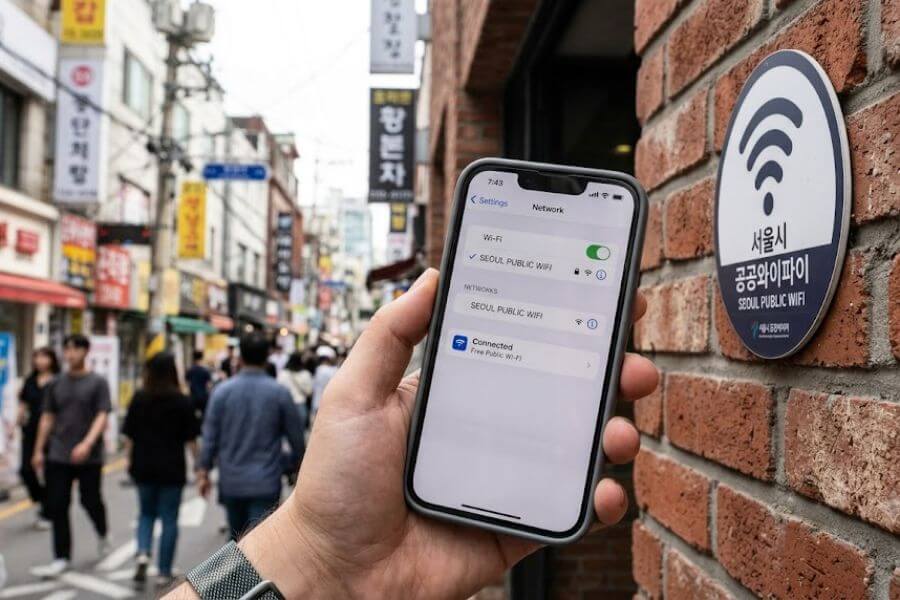
Seoul is a paradise for staying online, featuring tens of thousands of hotspots that let you open your favorite applications, chat with friends, and find your location without paying a single cent. This comprehensive guide shows you exactly where to look, how to connect securely, and how to maintain a strong signal from the deep underground subway lines to the breezy parks along the Han River.
Understanding the Built-In Digital Infrastructure of Seoul
South Korea boasts some of the fastest internet access on the planet, and its capital city operates a massive network of public routers designed to keep everyone connected. The local government treats online access as a basic service, meaning you are rarely more than a few steps away from a strong signal.
Before searching for networks, it helps to know what names to look for on your smartphone or tablet. The city uses specific identifiers across its districts, and recognizing these official names prevents you from clicking on dangerous impostor networks.
The Standard Public Network Identifiers
When you open your network settings screen anywhere in the city, you will likely see a long list of choices. The most common official option provided by the local government is simply named SEOUL. This open network requires no password and is accessible to any device, whether you use an American smartphone, an international tablet, or a laptop.
Another common name you might see in specific residential neighborhoods or public facilities is KkachiOn, named after the magpie, which is the official bird of the city and a traditional symbol of good news.
Open Networks Versus Secure Networks
The standard open network is fantastic for a quick check of your map, but the city also provides an encrypted alternative that protects your personal data from prying eyes. Next to the standard open option, you will almost always see an option called SEOUL_Secure.
Choosing the secure option requires a tiny bit of initial setup, but it keeps your usernames, passwords, and private messages safe while you browse. The login details for this secure network are uniform across the entire city, allowing your phone to link up automatically once you configure the settings the first time.
The Role of Major Telecom Providers
Apart from the municipal government, the massive telecommunications corporations in the country also contribute to the local wireless landscape. Companies like SK Telecom, KT, and LG Uplus operate their own extensive networks across the city.
While these routers primarily serve paying local subscribers, many of them offer open channels for the general public, often labeled with the word Public or Free attached to the brand name. Knowing how to leverage both city-run and corporate-run signals ensures you never experience a dead zone.
Navigating the Comprehensive Subway Network Connection
The underground transportation system here is globally famous for its cleanliness and punctuality, but its wireless capabilities are equally impressive. You do not have to lose your connection just because you are traveling fifty feet below the ground inside a concrete tunnel. Every single train car, platform, and transfer walkway functions as a high-speed data corridor.
Connecting on the Station Platforms
As you swipe your transportation card through the turnstiles and head down to the boarding platforms, your device will encounter an incredibly dense concentration of routers. The transit authority installs multiple access points along the tracks to handle thousands of commuters simultaneously.
Waiting for your train is the perfect time to download offline maps, update your travel applications, or stream a quick video because the stationary platform signals are remarkably stable and fast.
Maintaining Your Signal Inside the Moving Train Cars
The real magic happens when you step inside the actual train carriages. Unlike many underground transit networks around the world where signals vanish the moment the doors close, local trains carry mobile relay equipment right on board.
As the train speeds through dark tunnels between stations, the onboard routers connect to external tracksides and maintain a seamless bridge for your device. This means you can video chat with your family across the world while hurtling beneath the Han River.
Managing High-Traffic Congestion
Because millions of students, commuters, and tourists ride these underground lines every day, the networks face intense pressure during morning and evening rush hours. If you find your connection stalling between the hours of eight and nine in the morning, or six and seven in the evening, the culprit is sheer volume rather than a broken router.
Moving away from the center of the platform or waiting until the train empties out slightly can instantly boost your speeds, as fewer devices will be competing for the same slice of bandwidth.
Unlocking Public Squares Parks and Outdoor Spaces
If you prefer spending your days breathing fresh air and exploring historical landmarks, you will be happy to know that the digital infrastructure follows you outdoors. The city government explicitly designs its major tourist zones and green spaces to function as data-free environments for visitors.
The Expansive Han River Parks
The massive ribbon of green space that stretches along the central river is a prime destination for afternoon picnics, bicycle rentals, and evening drone shows. It is also home to hundreds of outdoor routers. Major gathering points like Yeouido Han River Park and Banpo Han River Park feature high-density routing zones.
You can reliably find strong signals near the water fountains, the convenience stores where people cook instant noodles, and the designated food delivery pickup zones. However, if you wander too far down the isolated dirt bike paths or sit directly under the massive concrete bridge foundations, the physical barriers might block the signal, forcing you to step back toward the open grassy lawns to reconnect.
Historical Plazas and Royal Palaces
Centuries-old history and futuristic technology collide in places like Gwanghwamun Square and the grounds surrounding Gyeongbokgung Palace. While exploring the stone courtyards where kings used to walk, you can connect to the municipal network to read up on the history of the Joseon Dynasty.
The city places hidden routers inside traditional looking structures and lampposts to preserve the visual beauty of the historical sites while ensuring your phone maintains a crisp link for uploading photos of your traditional clothing rentals.
Trendy Shopping Streets and Pedestrian Zones
Walking through crowded outdoor commercial districts like Myeong-dong, Insadong, or the fashion alleys of Seongsu-dong can feel overwhelming, but staying online there is remarkably simple. The local business associations partner with the city to blanket these pedestrian streets with high-speed routers.
As you browse through cosmetic shops or search for trendy cafes, your phone will jump from one neighborhood router to the next, allowing you to compare prices online or look up restaurant reviews in real time without pausing your walk.
Utilizing Traditional Markets and Indoor Public Facilities
When the weather gets too hot or a sudden summer rainstorm sends you running for cover, the indoor landscape offers an abundance of free digital shelters. From bustling traditional food hubs to modern administrative centers, indoor options are plentiful and highly reliable.
The Vibrant Network of Traditional Markets
Places like Gwangjang Market or Namdaemun Market are sensory overloads filled with the aromas of mung bean pancakes, simmering tteokbokki, and mountains of vintage textiles. Amidst the low-hanging banners and crowded stalls, the local government has installed modern fiber-optic public routers.
This infrastructure allows you to use digital translation applications to communicate with the market vendors or point to specific dishes on your screen, making the cultural barrier easy to manage even in the middle of a chaotic lunch rush.
Public Libraries and Cultural Centers
For a quiet place to sit down with a laptop and get some serious work or study done, the public library system is an unmatched resource. The breathtaking Seoul Metropolitan Library located right at City Hall, along with neighborhood branches in every district, offers pristine, high-speed networks to anyone who walks through the doors.
These spaces provide comfortable seating, charging outlets, and air-conditioned environments where you can download large files or organize your travel photos in complete tranquility.
District Community Centers
Every neighborhood features a local administrative office known as a Community Center or Dong住民Center. These buildings serve local residents, but their lobbies are open to the public and always feature free municipal wireless networks.
If you ever find yourself lost in a quiet residential area far from tourist landmarks and need a safe place with working internet to figure out your bus route, simply look for the official government flag outside these neighborhood centers and step inside the lobby.
The Smart Coffee Shop and Cafe Strategy
While public networks run by the government are incredibly widespread, the local private cafe culture provides a luxurious backup plan for digital nomads and weary travelers. The city boasts one of the highest concentrations of coffee shops per capita in the world, ranging from massive multi-story corporate chains to tiny, independent neighborhood establishments.
The Universal Password Policy
Almost every single cafe in the city provides complimentary high-speed internet to its paying customers. In most cases, you do not need to fill out an annoying registration form with your email address or phone number. Instead, the network password is printed directly on the bottom of your paper receipt, stamped onto the sleeve of your coffee cup, or written on a small chalkboard near the pickup counter.
Buying a cheap bottle of water or a shot of espresso unlocks hours of uninterrupted, lightning-fast internet access along with a comfortable place to charge your devices.
Large Corporate Chains vs. Independent Spaces
If you need guaranteed speed and an abundance of electrical outlets, heading to a large chain like Twosome Place, Ediya Coffee, or Pascucci is a foolproof option. These brands install commercial-grade lines that can handle heavy usage, making them ideal for video calls or uploading large files.
On the other hand, the artistic independent cafes in neighborhoods like Yeonnam-dong or Ikseon-dong offer unique atmospheres, though their routers might be smaller consumer models. If you plan to work from an independent cafe, it is polite to check the signal strength and look for an available wall outlet before making your purchase.
| Cafe Type | Best For | Outlet Availability | Connection Method |
| Major Corporate Chains | Heavy downloading and video calls | Extremely high, often at every seat | Password printed on the purchase receipt |
| Independent Boutique Cafes | Casual browsing and aesthetic vibes | Limited, usually along the walls | Password written on a central chalkboard |
| 24-Hour Study Cafes | Long late-night working sessions | Guaranteed at every individual desk | Access code provided via automated kiosk |
A Step-by-Step Connection Process
Connecting your device to the local public internet is generally straightforward, but knowing the precise steps prevents you from getting stuck on empty landing screens or experiencing frequent disconnections.
Step 1: Turn On Your Wireless Radio and Scan
Open the settings menu on your smartphone or computer and ensure your wireless communication card is active. Give the device a few seconds to scan the surrounding airwaves. Look for the network labeled SEOUL or SEOUL_Secure.
If you are inside a specific venue like a museum or a bus terminal, you might also see a variation like Public_WiFi_Secure. Select the network that shows the strongest signal bars.
Step 2: Navigating the Open Web Portal
If you choose the standard open SEOUL option, your device will connect immediately, but you will not have internet access quite yet. You must open a standard web browser like Safari or Chrome. The network will automatically redirect your browser to an official government landing page.
This page usually features a large button that says Internet Connect or Free Access. Click this button, wait for the short confirmation animation to finish, and your device will be granted full access to the global internet.
Step 3: Configuring the Secure Network
To bypass the landing page in the future and keep your data encrypted, it is highly recommended to configure the SEOUL_Secure network instead. When you click this network, your device will prompt you for a username and password. Enter the exact settings below into the prompt box.
- EAP Method: Select PEAP from the dropdown menu.
- CA Certificate: Select Do Not Validate or Trust on First Use.
- Identity: Type the word seoul in lowercase letters.
- Password: Type the word seoul in lowercase letters.
- Anonymous Identity: Leave this field completely blank.
Once you save these configuration settings, your device will automatically log into the secure public network whenever you walk within range of a city router, saving you time and protecting your digital footprint.
Vital Security Rules for Public Network Hopping
Using public internet networks anywhere in the world carries inherent security risks, and despite the incredible safety of South Korea in physical spaces, the digital world requires caution. Protecting your personal identity and financial accounts should always be a priority when utilizing free access points.
Avoid Financial Transactions on Open Networks
Never log into your online banking application, transfer money, or type your credit card numbers into a website while connected to an unencrypted public network. If you absolutely must purchase a train ticket or check your bank balance while on the move, ensure you are utilizing the configured secure network option, or wait until you can log into a trusted private connection at your accommodation.
Keep Your Device Software Updated
Before you leave for your trip or head out for a day of exploring, make sure your operating system and web browsers are updated to the latest versions. Security patches protect your device from known vulnerabilities that malicious parties might try to exploit on shared public routers. Keeping your internal firewall active adds an extra layer of defense against unauthorized incoming connections.
Use a Virtual Private Network
A Virtual Private Network, commonly referred to as a VPN, is an exceptional tool for travelers who rely on public connections. This software creates an encrypted tunnel between your smartphone and a secure external server, making it completely impossible for anyone sharing the public router to intercept or read your data traffic.
Activating your protection before clicking the public login button guarantees total privacy regardless of which network you choose to use.
Troubleshooting Common Connection Failures
Even in a highly advanced metropolis, technology can occasionally hit a snag. Knowing how to troubleshoot common network issues will save you from frustration and get you back online in seconds.
The Landing Page Refuses to Pop Up
The most frequent problem users encounter with open networks is the automated landing portal failing to display on their screen, leaving them connected to the router but without actual internet access. If this happens, open your web browser and type a simple, non-encrypted web address into the URL bar, such as a basic news site or a blank search page.
This manual request forces the router to intercept your traffic and display the required login screen. Alternatively, you can go into your network settings, choose to forget the network, and click it again to restart the handshake process.
The Signal Keeps Dropping Frequently
If your connection cuts out every few minutes, you are likely standing in a transition zone between two competing routers, or a physical obstacle like a thick concrete wall or heavy metal structural beam is blocking the path.
Walking a few paces toward an open window, stepping out from beneath an awning, or moving away from large clusters of electronic machinery will usually stabilize your connection.
Your Device Connects but Data Move Incredibly Slowly
When your connection exists but websites take ages to load, the router is likely overwhelmed by a high volume of nearby users. Turn off your wireless radio for ten seconds and turn it back on.
This quick reset often forces your device to connect to a different, less congested access point nearby rather than clinging to the overloaded router it initially discovered.
Smart Tools to Download Before Your Adventure
To make your journey through the city completely effortless, it is wise to download a handful of local digital tools while you still have a strong internet connection at your hotel or the international airport. The local digital landscape relies on specific regional applications that perform significantly better than global alternatives.
Local Navigation Applications
Global mapping tools frequently struggle to provide accurate walking directions or real-time public transit schedules within South Korea due to local spatial data regulations. To find your way around efficiently, download regional mapping services like Naver Map or KakaoMap.
These applications provide incredibly precise updates on bus arrival times, detailed layouts of underground subway exits, and even the exact locations of public restrooms and official wireless routing zones.
Communication and Translation Utilities
To interact with locals, read menus that lack English translations, or communicate with shop owners, download KakaoTalk for messaging and Papago for language translation.
Papago allows you to snap photos of street signs or handwritten notes and translates them instantly. Having these tools ready on your home screen ensures that the moment you link up to a public network, you can navigate any social or linguistic situation with total confidence.
Frequently Asked Questions
Is the free public internet in Seoul safe for tourists to use?
Yes, the official networks provided by the local government are highly reliable and monitored for stability. However, like any public network across the globe, unencrypted connections can leave your data exposed to others sharing the router. To maximize your digital safety, always utilize the secure connection option by typing the official credentials into your settings, keep your smartphone operating system fully updated, and run a trusted virtual private network to encrypt your traffic whenever you access personal accounts.
Why does my phone say I am connected to the network but nothing will load?
This issue typically occurs because your device has linked up to the physical router but you have not yet completed the authentication process on the government landing page. To solve this, open a standard web browser on your device and wait for the official welcome portal to display on your screen. Click the central button to authorize your session. If the portal does not appear automatically, type a simple web address into your browser bar to force the redirection screen to load.
Can I stream high-definition videos or play online games using the municipal networks?
In most public locations, the internet speeds are exceptionally fast and can easily handle high-definition video streaming, voice calls, and online gaming. The local government utilizes modern fiber-optic hardware to support massive bandwidth. However, inside incredibly crowded environments such as major underground transit transfer stations during the evening rush hour, the high volume of simultaneous users can cause speeds to drop, making basic web browsing and text messaging more practical until the crowd thins out.
Do I need a local South Korean phone number to access the free city networks?
No, you do not need a local phone number, a specialized SIM card, or a domestic cellular plan to utilize the official public networks. The municipal service is open to everyone, including international travelers using foreign devices. The open network only requires you to click through a basic web portal, while the secure network utilizes a universal public username and password that anyone can enter into their device settings without any registration process.
Where can I find a place to plug in my device charger when my battery runs low?
If your battery begins to drain while you are out exploring, the best places to head are large corporate coffee shop chains, public libraries, or major transit hubs. Local cafes are incredibly accommodating to tech users and typically provide multiple electrical outlets directly beneath the tables or along the seating benches. Additionally, many major underground subway stations feature public digital kiosks and charging shelves where commuters can plug in their USB cables for a quick power boost.
How do I stop my device from constantly disconnecting when I walk down the street?
When you are moving quickly through the city, your device will naturally try to disconnect from a fading router and search for the next closest access point. To prevent your connection from dropping and constantly interrupting your browsing, configure your device to use the secure network alternative. Once configured, your smartphone will manage the handoffs between municipal routers silently in the background, allowing you to walk through different neighborhoods while maintaining a continuous online session.